Easy Comp
Easy Comp helps you placing layers on top of your footage and automatically matching the colors.
You can download the latest installers from https://blaceplugins.com/product/easy-comp/.
Setup & Demo Project
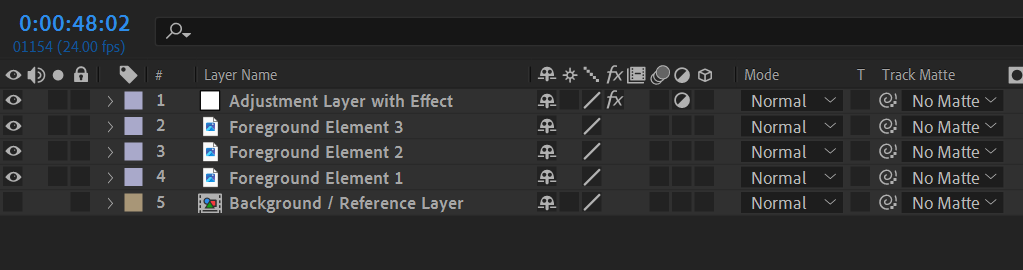
At the bottom you have your (invisible) reference / background layer. This is the layer the foreground elements will be matched to. Above that you have one or more foreground layers. Play with the bluriness of the alpha channel / masks to find the best results. Finally you have an adjustment layer with the effect applied. In the effect you link the reference / background layer.
Parameters
Background layer
The reference layer the footage shall be matched to. Needs to be invisible in order to not break the composition chain.
Mixing mode
Overlay will only adapt colors and leave foreground elements opaque, while Blend adapts transparency to match the elements.
High Resolution
Will keep all fine details at the cost of slightly slower execution time.
Output mode
Output composition results or foreground only.
Backend & Performance
Hardware Acceleration (on GPU version of the plugin only)
Run calculations on the GPU. This will give massive speedups compared to CPU mode.
Lower Precision
Compute with reduced precision if possible. This can save up to half of the memory and give you some speedups.
Optimize for low VRAM
If you have not that much graphics card memory enabling this will try to optimize memory consumption.
Samples (not available for all settings)
The number of ai samples to calculate. This will improve the models accuracy.
Computation Tiles (not available for all settings)
Split the computation into several tiles. This can help if you run out of memory.